

What’s New in Qlik Cloud
– March 2026 Updates –
Welcome to the next edition of the ‘What’s New in Qlik Cloud’ blog for March 2026!
Authors: Roger Gray, BI Manager & Tom Cotterill, BI Consultant, at Climber.
Data Analytics
This month, a set of powerful analytics enhancements were released in Qlik Cloud. From the general availability of the agentic AI experience to visualisation improvements, expanded automation capabilities, and usability updates across the platform.
1. Qlik Answers Agentic Experience
Qlik’s agentic experience in Qlik Cloud has reached general availability, delivered through Qlik Answers as a unified conversational interface. It brings together structured data analytics, unstructured documents, and the reasoning power of large language models in a governed, explainable experience.
The agentic experience includes:
- Qlik Answers: Q&A backed by the Qlik Analytics Engine and curated document collections, providing citations and reasoning explanations
- Discovery Agent: Continuously monitors key measures and flags meaningful anomalies so teams can act before issues escalate
- Data Products for Analytics: Curated, governed datasets with stewardship and quality signals, giving both humans and AI a reliable foundation for analysis
2. Qlik MCP Server
The Qlik Model Context Protocol (MCP) server is now generally available. It enables third-party AI assistants, including Anthropic Claude, Microsoft Copilot, and others, to securely access Qlik’s analytical capabilities and trusted data products via APIs.
The MCP server allows assistants to:
- Request analysis using Qlik-managed measures within an organisation’s governance framework
- Retrieve material from controlled document sets and cite those sources in responses
- Call Qlik for analysis without copying data or bypassing governance controls
3. Data Products for Analytics
Data Products and Data Quality are now available in Qlik Talend Cloud Premium, Qlik Cloud Analytics Premium, Qlik Cloud Analytics Enterprise, and Qlik Sense Enterprise SaaS. Trusted data products can be accessed and used directly within analytics workflows.
Key improvements include:
- New entry points in the Analytics Activity Center provide faster access to data products, data marketplace, and data quality features
- Analytics users can easily use data products and datasets when creating new analytics assets
- A unified Select Data dialog is now available across analytics workflows, surfacing data products, the data marketplace, the Qlik Trust Score, and data quality indicators
4. Browsing Improvements Driving Efficiency
Navigation and browsing in Qlik Cloud has been improved to help users find the content they need more quickly. Updates reduce the number of clicks required to reach apps, spaces, and data assets, improving day-to-day efficiency for both business users and developers.
5. Add Fields to the Selection Bar
Users can now add specific fields to the selection bar in Qlik Cloud Analytics. This allows frequently used filter fields to be pinned and quickly accessible during analysis, reducing navigation steps and helping users maintain context across sheets.
6. Option Reload of ODAG Generated Apps
On-Demand App Generation (ODAG) now supports option reloads, allowing generated apps to be selectively reloaded based on updated parameters. This reduces the overhead of full reloads for ODAG apps that only need specific sections refreshed, improving efficiency for users working with large on-demand datasets.
7. Group Public Bookmarks as an App Developer
App developers can now organise public bookmarks into groups within an app. This makes it easier for business users to navigate to the most relevant analytical views, particularly in apps with a large number of saved selections and use cases.
8. Spot Potential Bias During Training with Qlik Predict
Qlik Predict now helps data scientists and analysts identify potential bias during model training. The platform surfaces signals such as imbalanced groups and proxy features, giving users visibility into factors that could lead to biased predictions.
Review flags and metrics in the training summary to validate features and decide on appropriate actions before deploying a model. This enhancement supports responsible AI practices and helps teams meet internal governance and regulatory expectations around model fairness.
9. Keep Track of Deprecated Charts
The App Analyzer now includes a dedicated sheet showing how and where deprecated charts are being used across your Qlik Cloud tenant. The App Analyzer works from usage events rather than scanning every app, providing an efficient way to identify which apps and sheets contain charts that need to be updated to newer alternatives.
This feature also appears in the Data Integration filter as it applies to tenant-wide governance. Install or update the App Analyzer using the automation template available in the Qlik Cloud Monitoring Apps.
10. Qlik Automate Webhook Automations Now Run Up to 4 Hours
Qlik Automate webhook automations now run for up to 4 hours, significantly extending the previous 15-minute limit. This enables more complex, long-running workflows to complete without interruption.
Users can manage concurrency to optimise resource usage. This is particularly valuable for task-chaining scenarios, large app reload orchestration, and workflows that interact with slower third-party systems.
11. Inline Images in the Text Object
Qlik Cloud now supports inline images in the Text object, allowing users to enrich dashboards by embedding images from the media library. Images can be resized and aligned within the text object to suit the layout.
This improvement gives app developers greater flexibility when designing information-rich sheets that combine text, instructions, and visual content in a single object.
12. Introducing a New Permission for Private Automations
A new permission has been introduced to give administrators more granular control over who can create and manage private automations in Qlik Cloud. This update supports stronger governance over automation resources and reduces the risk of unmanaged workflows proliferating across a tenant.
Administrators can now assign or restrict this capability as part of their role and access control strategy.
13. New Script and Chart Functions
This release introduces new script and chart functions that expand what developers and analysts can express in load scripts and visualisations. These additions provide additional analytical flexibility and reduce the need for complex workarounds.
The new functions integrate with existing Qlik scripting and chart expression syntax, making them immediately accessible to developers familiar with the platform.
14. Manual Compute Environment Selection for Applications
Administrators can now manually set a minimum engine size for performance-critical analytics applications via the Apps API. While Qlik Cloud automatically places applications on the most appropriate available engine, this new capability allows teams to override that placement and guarantee a minimum level of compute resources.
Engine sizes range from 40 GB to 200 GB. This is particularly useful for applications with complex visualisations, large hypercubes, or predictable performance requirements that demand consistent resource allocation.
15. New Direct Access Gateway Version (1.7.11)
A new version of the Qlik Data Gateway – Direct Access (version 1.7.11) has been released. This version includes enhancements to ODBC connector visibility in the Qlik Cloud UI and stability improvements for connector configuration managed via the administration activity centre.
Customers are advised to upgrade to the latest version to benefit from the full set of configuration options, including those introduced in recent API updates.
16. Introducing the New Qlik Account Profile Page
Qlik Cloud now features a new dedicated Account profile page, giving users a centralised location to view and manage their personal account information. This update improves consistency across the platform and provides a cleaner foundation for managing individual user settings.
17. Improved Clarity and Consistency in the Embedded Scheduler
The embedded scheduler in Qlik Cloud has been updated to improve clarity and consistency in how scheduled tasks are configured and displayed. Users benefit from a more intuitive interface when setting up reload schedules directly within the app experience.
18. Streamlining User Types in Qlik Cloud Capacity-Based Subscriptions
Qlik Cloud has simplified user management for capacity-based subscriptions by removing the Basic User and Full User distinction. All users authenticating to a capacity-based tenant will now be treated as Full Users. User capabilities remain governed by access control roles rather than user type.
What changed:
- The concept of Basic User has been removed from the product
- All users purchased under capacity entitlement are available as Full Users
- The auto-assignment toggles in Settings > Entitlements have been removed
- To grant roles to all users, use the Auto assign option in Manage users > Permissions
Current access control configuration for existing users is unchanged. Administrators should review their User Default role and custom role assignments to ensure access remains correctly configured.
19. Drag and Drop Columns in the New Straight Table
The new straight table in Qlik Cloud now supports drag and drop column reordering. Users can rearrange columns without affecting the underlying chart configuration or default sort order. This is available in both edit mode for developers and analysis mode for end users through chart exploration.
20. Introducing Keyboard Shortcuts for the Automation Editor
The Qlik Automate editor now supports keyboard shortcuts, allowing automation developers to work more efficiently when building and editing workflows. Common actions such as copy, paste, undo, and navigation between blocks can now be performed without using the mouse.
21. OAuth Web Clients Support Private Key JWT
OAuth web clients in Qlik Cloud now support private key JWT (JSON Web Token) authentication. This enhancement improves security for OAuth-based integrations by allowing clients to use asymmetric key pairs for authentication, reducing reliance on client secrets that may be exposed.
This change is relevant for developers building embedded analytics and API integrations that use OAuth authentication flows.
Data Integration
March brings a strong set of updates across Qlik Talend Cloud, with improvements spanning streaming ingestion, Lakehouse interoperability, and data governance. Open Lakehouse continues to evolve with new streaming capabilities and expanded mirroring options. Additional connectors and operational features make it easier to integrate, monitor, and troubleshoot modern data pipelines.
1. Streaming ingestion capabilities for Qlik Open Lakehouse
Qlik Open Lakehouse now supports high-throughput streaming ingestion, allowing large volumes of event data to be landed directly into Apache Iceberg tables running in your AWS environment.
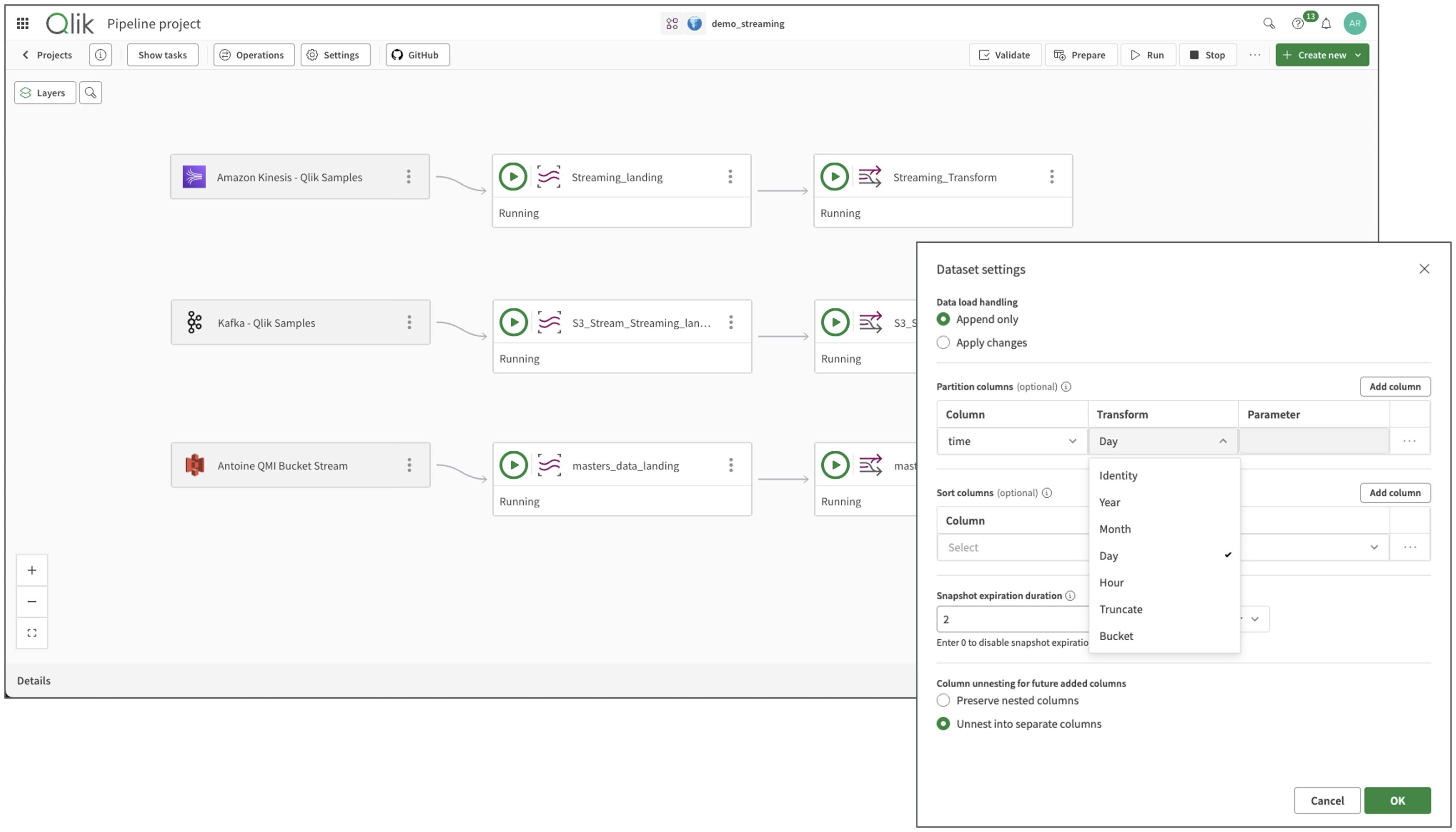
Three new streaming source connectors have been introduced for Apache Kafka, Amazon Kinesis, and Amazon S3, supporting common event formats such as JSON, Avro, Parquet, and CSV.
To support streaming workloads, two new task types have been introduced:
- Streaming Landing Task
Continuously stages raw streaming events on Amazon S3, acting as a buffer before transformation into Iceberg tables. Retention policies can be configured to control how long staged data is stored. - Streaming Transform Task
Converts landed events into query-ready Iceberg tables. It supports both append-only ingestion and apply changes processing with SCD Type 2 historical tracking.
Transformation capabilities include handling complex hierarchical payloads through STRUCT unnesting and ARRAY flattening. Performance and lifecycle management can be tuned through Iceberg features such as partitioning, column sorting, and snapshot expiration, while automatic schema evolution allows pipelines to adapt to changes in streaming data structures.
Downstream mirroring to cloud data warehouses is also supported.
Note: Not supported in Qlik Cloud Government or Qlik Cloud Government – DoD.
2. Mirror data to Amazon Redshift from Qlik Open Lakehouse
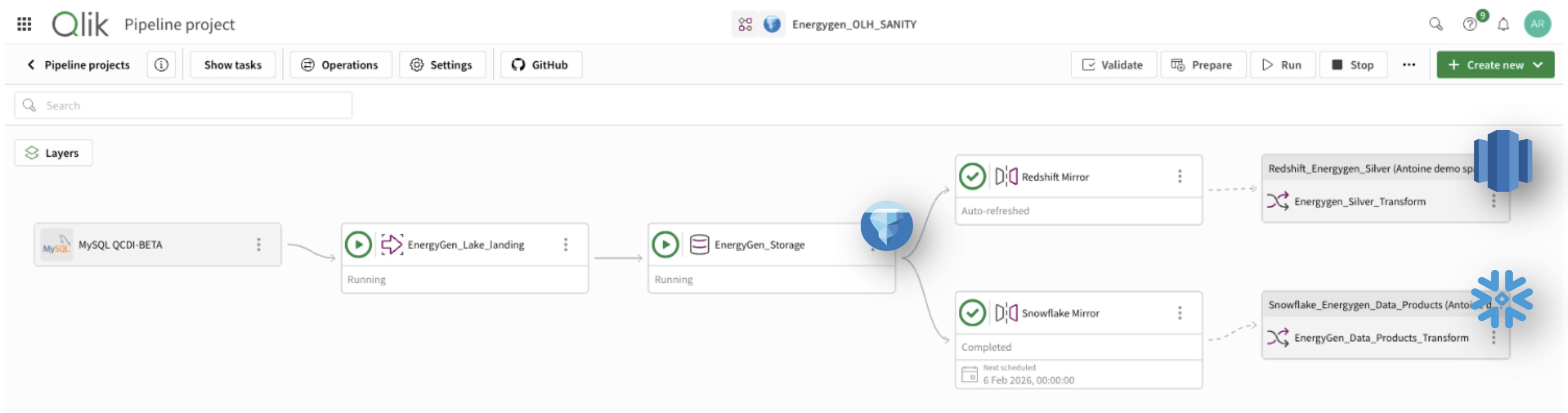
Qlik Open Lakehouse projects now support mirroring data to Amazon Redshift, extending the data mirror capability to additional analytics platforms. Alongside existing targets such as Snowflake, Redshift can now query datasets originating from the same Iceberg-based Lakehouse project.
Mirror tasks allow a single dataset to be accessed from multiple cloud data warehouses without creating separate ingestion pipelines or duplicating the underlying storage. Data stored in Apache Iceberg tables within the Lakehouse can be queried from Redshift while remaining centrally managed within the Open Lakehouse environment.
This capability also aligns well with a Medallion architecture approach:
- Raw data is ingested into Bronze-layer Iceberg tables in the Lakehouse
- Data is mirrored to Amazon Redshift for downstream processing
- Transformations can then be applied in Redshift projects to produce Silver and Gold datasets
For Redshift users, Lakehouse data appears as if it were native to the warehouse, while Qlik manages data refresh and optimisation behind the scenes.
For more information, see Mirroring data to a cloud data warehouse.
3. Rich text editor for data product documentation
Data products can now be documented using a rich markdown editor, allowing clearer and more structured readme content. Documentation can include formatting and links, helping consumers quickly understand the purpose and usage of a data product.
Existing readmes remain fully supported, and when documentation is exported, the readme is included with its formatting preserved.
More information: Documenting a data product
4. Qlik MCP Server
The new Qlik Model Context Protocol (MCP) server allows external AI tools such as Claude, ChatGPT, and Microsoft Copilot to interact with Qlik’s analytics engine while respecting existing governance controls.
From a data integration perspective, this provides a governed pathway for AI tools to analyse trusted datasets and data products created in Qlik Talend Cloud, without copying data outside the platform.
5. Kafka target connector
Qlik Data Integration now includes a Kafka target connector, allowing data from supported sources to be replicated directly into Apache Kafka environments. This enables low-latency replication from operational systems into on-premises Kafka clusters or Amazon MSK, supporting scenarios where Kafka is used as a central event backbone or streaming integration layer.
Replicating to Kafka on-premises requires Data Movement Gateway 2025.5.40 or later. Replicating to Amazon MSK only requires the same gateway version if the cluster cannot be accessed directly from Qlik Cloud, for example when it resides inside a VPC.
More information:
Kafka target
Setting up Data Movement gateway
6. On-demand log file decryption
When troubleshooting complex issues, Qlik Support may ask you to enable Trace or Verbose task logging. In these cases, sections of the generated log files that contain sensitive information are automatically encrypted.
This allows logs to be shared with Qlik Support while protecting sensitive data. If deeper analysis is required, the encrypted sections can be decrypted by Support using a secure key provided by the customer.
More information: Sharing encrypted log files with Qlik Support
7. Data stewardship
Qlik Talend Cloud now supports Data Stewardship from within the Qlik Cloud interface, allowing organisations to involve domain experts when automated data quality checks are not sufficient to resolve an issue.
Instead of relying solely on automated validation rules, data stewards can review and correct problematic records before they continue through the pipeline. This introduces a human-in-the-loop step into governed data workflows.
Key capabilities include:
- Human-in-the-loop remediation
Data stewards can review, correct, and validate records flagged by data quality rules when automated processes cannot resolve the issue. - Rule-based data correction
Existing semantic types and validation rules in Qlik Cloud can be reused to ensure data is corrected consistently and according to defined standards. - Integration with Talend Studio
Corrected records can be reintroduced into existing Talend Studio jobs, allowing remediation workflows to feed clean data back into downstream processing layers.
More information: Validating and correcting your data with data stewardship
Summary
One of the most exciting updates this month is Qlik’s new agentic experience in Qlik Cloud, delivered through Qlik Answers as a unified conversational interface. It brings together structured data analytics, unstructured documents, and the reasoning power of large language models in a governed, explainable experience.
Overall, this month’s updates continue to strengthen Qlik Talend Cloud across both architecture and day-to-day operations. From streaming ingestion and expanded Lakehouse interoperability to improved connectors, governance features, and troubleshooting tools, the platform continues to evolve as a foundation for building trusted, modern data pipelines.
SUBSCRIBE
Want to stay up to date with the latest features that are released in Qlik Cloud?
Subscribe to our blog and get monthly updates directly to your inbox.
WANT TO KNOW MORE? CONTACT US!
Bas Haarhuis
Advisor Data & Strategy
bas.haarhuis@climber.nl
+31 6 39 46 39 65
Jordy Wegman
BI Manager
jordy.wegman@climber.nl
+31 6 11 62 68 58
Nieuws
What’s New in Qlik Cloud – March 2026
An exciting update this month is Qlik’s new agentic experience in Qlik Cloud, delivered through Qlik Answers as a unified conversational interface. Qlik also continues to strengthen Qlik Talend Cloud across both architecture and day-to-day operations.
>> Read more
Beyond QVDs: Building a Trusted Data Foundation with Qlik Talend Cloud
In this 40-minute webinar, you’ll learn why some organisations are rethinking QVD-centric architectures, what’s changed in the data landscape, and how Qlik Talend Cloud supports a trusted data foundation that becomes more cost effective and easier to operate over time.
>> Register now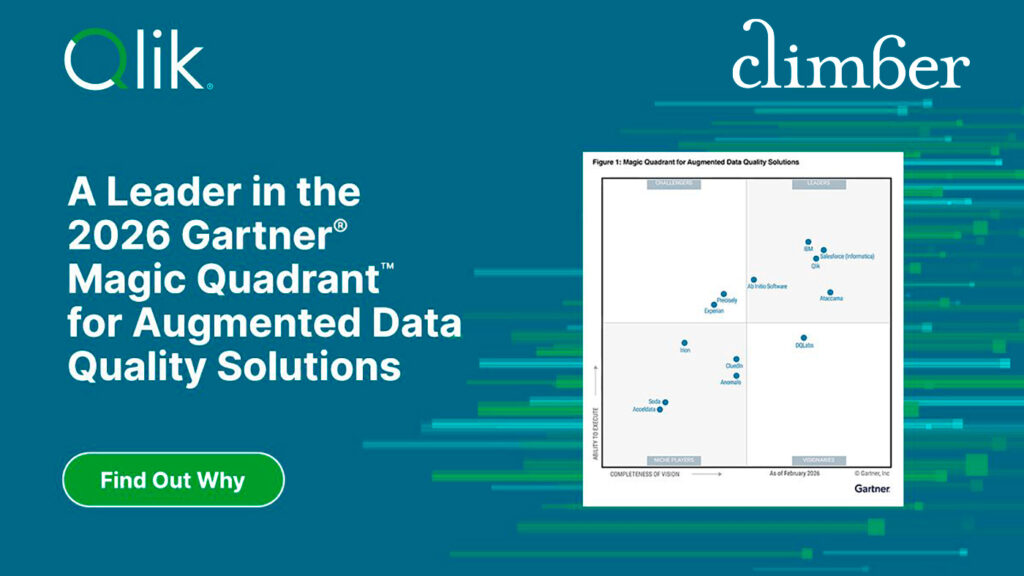
Qlik a Leader in the 2026 Gartner Magic Quadrant for Augmented Data Quality Solutions
Gartner has published the 2026 Magic Quadrant for Augmented Data Quality Solutions. After reviewing 13 top vendors, they have once again positioned Qlik as a Leader – marking the seventh time!
>> Download the report